Windows Phone Family Locates Life360!
![[Blog] Image placeholder](https://images.ctfassets.net/nywvtjnh7p05/7gT5B1WUEVlA4WBUy3pwHR/607bc4e0635a5733d3b612e8ab2509a8/image-fallback.jpg?w=1920&fm=webp)
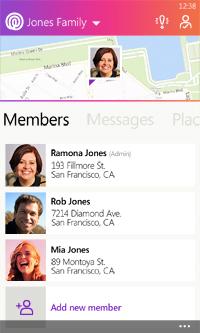
That’s right, it is finally here! The Life360 Family Locator app is now available in the Windows Phone store for WP8 and above. That means now everyone in your family can stay connected on Life360 regardless of the device! iPhones, Androids, Windows Phones, and even non-smartphones.
Most of us have families that have all kinds of devices and different operating systems. The addition of Life360 for Windows Phone fills that gap for this growing segment of users. This also means that if you decide to change phones and switch to a different type you will still be able to continue using Life360 without any interruptions. Just download the app to your latest device and log in to be connected to your existing account.
If you are new to Life360 you will be amazed at what it can do. You create a Circle (group) of your family and friends in the app. Then Life360 uses GPS technology to locate all of the group members and it neatly shows you each member on a map with their own icons. Alerts can be set up so you receive a notice when someone in your circle arrives or leaves a location, like home, school or work. This is perfect for keeping that peace of mind that your kids arrived to school safely and made it back home the same way! Life360 also keeps families connected– especially when schedules change or you’re traveling. Messaging within Life360 allows you to quickly let everyone know things like where to meet for dinner or that it is time for the family to meet back up at a certain spot in the mall to head home.
While you can do some of these tasks on your smartphone already, Life360 brings everything together in one place, and now on everyone’s platform, making it easier to locate and connect with the people in your inner circle in a private setting.
So for all of you Windows Phone fans out there (myself included) head over to the Windows Phone store and get the new Life360 Family Locator app now and give it a try. You will love the simplicity of the app, and how it keeps your family connected and provides the extra piece of mind.